
A shared operational picture for every incident.
On-Scene Command gives incident commanders and their teams the tools they need to manage incidents quickly and effectively. From the size-up, the 360, a live tactical map every crew at the incident can see in real-time, FIRECOM message drafts, the BA board, and a timeline nobody has to write up afterwards.
- Australian fireground language appliances, CODE 3, FIRECOM, the 360
- Production database in Sydney encrypted in transit and at rest
- Built for the fireground by a firefighter one serving firefighter and one software engineer
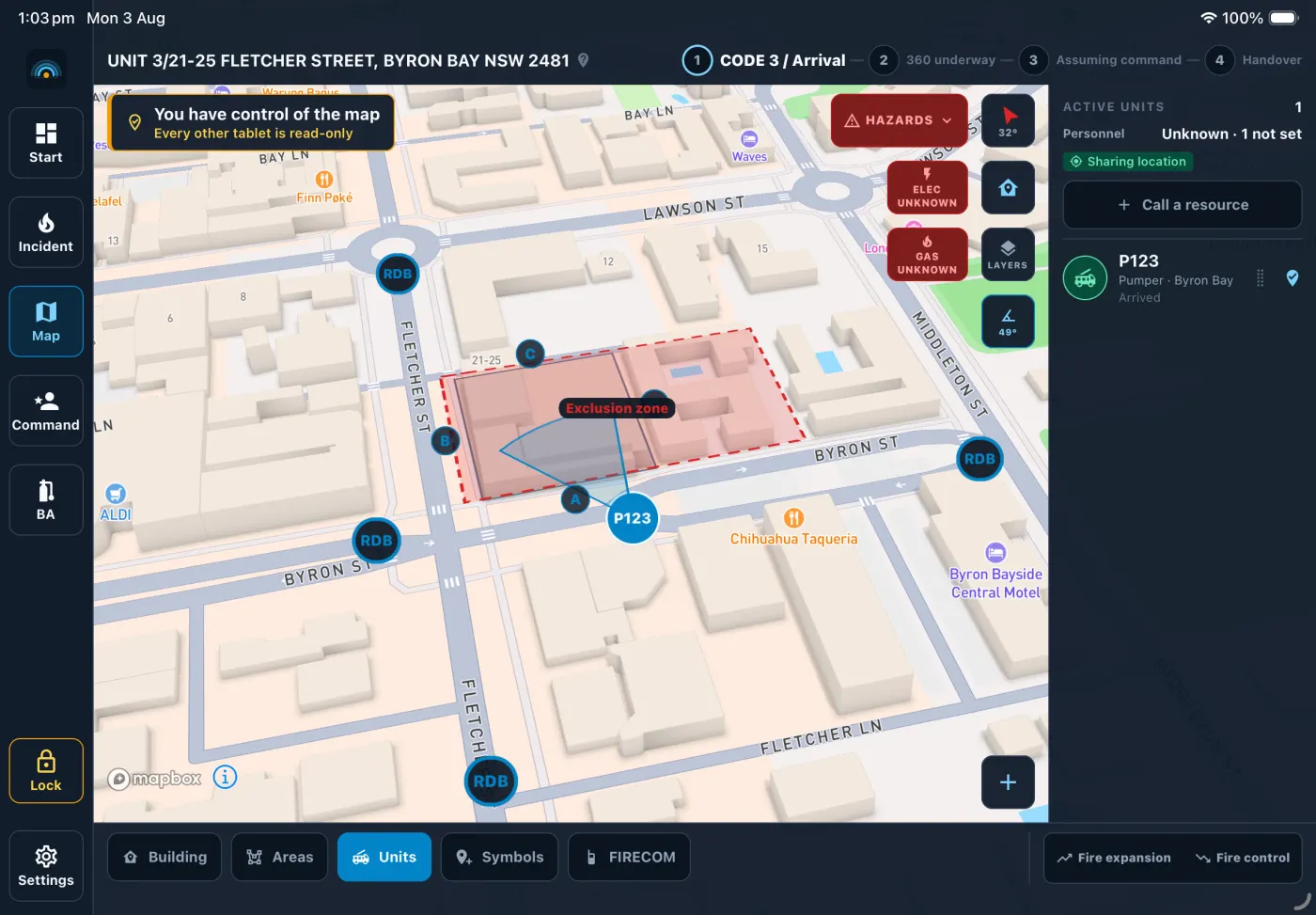
The size-up, the map, the boards and the record.
Operated through a structural glove, in glare or in the dark, on a tablet attached to a moving appliance. Every control on it is sized for that.
Live tactical map
Every appliance, every crew and every marker on one map, updating live for everyone looking at it. Positions are held in latitude and longitude, not in pixels, so the officer on the tablet and the duty officer in the station office are looking at the same ground.
Pre-incident plans
Crews walk a high-risk site on a drill and build the plan there, on the map the fireground itself uses: appliance positioning, staging, hydrants, access points and hazards. When a job comes in at that address, On-Scene recognises it and offers the plan to the incident controller — beside the job, and never copied into the incident record.
Size-up and the 360
The incident form follows the job: Code 3 and arrival, the 360 underway, assuming command. Life risk, building stability, utilities and energy systems, exposures and special hazards, in the order a walk around a building takes them.
FIRECOM messages, drafted for you
The size-up you have already entered becomes a FIRECOM message ready to read. It is a draft: editable, reviewed by the officer sending it, and never transmitted by the app.
BA board
Who is wearing a set, what task they are on, their cylinder pressure and time. Low-air warnings, RIT allocation, and an alert every wearer acknowledges — so the board says who has heard it, not just who was told.
Admin portal and the incident record
A web console for stations, with a live read-only view of anything running now. When it is over, the whole incident exports as a report and a zip: the timeline, the map and the attachments, in a form that can be handed to somebody.
An Australian fireground, not a translated one.
Incident command software written somewhere else arrives with somebody else’s words in it. This one was written on an Australian fireground, in the language spoken on it.
Australian wording, throughout
Appliances, not apparatus. CODE 3. FIRECOM. The 360. Sides A, B, C and D taken off the address face. Nothing on the screen has to be mentally translated at two in the morning.
The database is in Sydney
On-Scene’s production database runs in Sydney, in AWS’s ap-southeast-2 region, encrypted in transit and at rest. Secure by design, not by accident: the database is built to be isolated and to prove it.
Built by a firefighter
On-Scene started as one serving firefighter recognising a need on the fireground, incident commanders needed better tools to manage incidents. So he teamed up with a friend who is a software engineer, and they built it together.
The size-up you already entered, as a message ready to read.
Nothing is typed twice. The worksheet the officer has been filling in on the way to the job becomes a FIRECOM message in the order it is transmitted — and it is a draft, not a transmission.
FireCOM, P714 Code 3 at 12 Jonson Street Byron Bay. P714 will be known as Byron Bay Command. We have a large structural fire. House, Two levels. Working fire yes, located Roof space. Persons reported: yes, 2 adults, last known first floor bedroom. Current strategy is Offensive. Exclusion zone Established. Additional resources requested: Additional pump, Ambulance. Over.
All FireCOM message drafts are editable and must be reviewed before use.
The fireground On-Scene covers.
Every incident type here opens on the tablet today — shown as one list, because you should know exactly what you are buying.
This record may be read by a coroner.
What a crew enters on a fireground — the address, who is reported inside, who holds command — can be read years later, by people who were not there. Security is not a hardening pass on this product; it is how it is built.
Default-deny, in the database
Every table is protected by row-level security. Unless a policy explicitly permits a row, it does not exist for that caller — so the application cannot ask a question that returns data it should not have.
Isolation proven, not asserted
Around 970 database-level assertions sign in as each kind of user — a truck at one station, a truck at another, an administrator at a different agency, a stranger — and check what each can actually read. If one stops holding, the build stops.
Nobody else is watching
No analytics, no crash reporting, no advertising SDK, no support widget — not in the tablet app, and not on this page. The only third party is the map provider, which sees the tiles a crew asks for and nothing else.
See On-Scene on your own fireground
A short walkthrough with the people who built it — the size-up, the 360, the tactical map and a handover, on your ground rather than a demo suburb.